2012年2月24日星期五

Verizon and Redbox Develop New Video Service to Battle Netflix

After Netflix unveil its first original series, Verizon and Redbox are developing a new video service to compete against Netflix, which will combine Redbox's kiosk DVD and Blu-Ray rental service with streaming and downloadable video content made possible by Verizon's network. Specifics are scant at this point, but the new service seems primed to compete more directly with the once-thriving-now-struggling Netflix: like Netflix, the Redbox-Verizon service will apparently be subscription-based, meaning customers will pay a flat fee for access for to both physical DVDs from Redbox machines and an online trove of content available for both "on-demand streaming and download."


The companies said that the joint venture will launch in the second half of the year, and it will combine Redbox DVD and Blu-ray rentals with an on-demand streaming and download service from Verizon. The service will offer "subscription services and more," and it will be available on multiple platforms like smartphones, tablets, and televisions. Due to "competitive concerns," however, Verizon and Coinstar declined to provide details on exactly what they will offer or how much it will cost, and did not take questions during a Monday morning conference call. Redbox has DVD kiosks in supermarkets, drug stores, and other locations nationwide. Customers can reserve movies or games on their computers or smartphones, pick them up from a nearby location, and return them when finished. According to an NPD survey from last month, Redbox is now the most popular source of DVD and Blu-ray disc rentals.


Netflix customers pay a flat fee for an unlimited amount of movies and television shows, which they receive by mail or by streaming over the Internet; Redbox, meanwhile, has unleashed an army of DVD vending machines on the supermarkets and big box stores of America, offering rentals on a pay-per-night basis. With its partnership with Verizon to bring content to the web, however, Redbox is entering Netflix's territory; the company's CEO Reed Hastings has reiterated many times that he believes streaming media, not the physical DVD, is the future of his company. Redbox and Verizon join Amazon, Hulu, Dish Network/Blockbuster, and the movie studios' Ultraviolet as upstart competitors looking to unseat Netflix in the streaming space.


Redbox has kiosks at 29,000 locations nationwide, including grocery stores, convenience stores, drug stores, and at some Wal-Mart stores. "By offering instantly available online and mobile content with immediate access to physical media through rental kiosks, Verizon and Redbox will be uniquely positioned to deliver the best of both worlds—digital and physical—to consumers across the country," the companies said. Netflix is struggling after a shaky 2011, Verizon and Redbox will still have their work cut out for them. No mention of specific content was made, but Verizon said it will use its "industry-wide relationships with entertainment content providers" to ensure a good selection of movies online.

iPad to Mac

DVD Ripper for Mac

2012年2月22日星期三

Aiseesoft Introduces Brand New iPad Converter Suite Platinum of 2012 for All iPad Users

For all iPad users, Aiseesoft's iPad Converter Suite Platinum is definitely one of the best assistant software products. This professional iPad software enables users to rip any DVD and convert most popular video files to iPad formats, and transfer files between an iPad and a computer.

Aiseesoft's iPad Converter Suite Platinum is packed with iPad Video Converter, DVD to iPad Converter and iPad Transfer Platinum. The iPad converting software can help customers convert most popular DVD movies and videos to iPad-compatible video and audio formats. And the output video quality is perfect. This software also has powerful video editing features. With this iPad converter software, users can trim video length, crop video frame, watermark video, merge video clips together and so on. Moreover, this application can bring users a much higher converting speed with the AMD APP and NVIDIA-CUDA GPU processing acceleration technology.

The built-in iPad Transfer Platinum is an amazing iPad files transferring software. It is able to export all iPad files (movie, music, pictures, TV shows, podcast, iTunes U, eBooks, camera roll, voice memos, camera shot, etc.) to a computer, iTunes and other iPad devices. Also this software allows customers to import local files to an iPad. Besides the iPad, this software is highly compatible with iPod and iPhone devices. It can transfer iPhone SMS and Contacts to computer, and backup these files in this program. With this powerful transferring software, users can avoid the severe limitations and complex operations of Apple's iTunes.

Aiseesoft's iPad Converter Suite Platinum, which owns professional DVD/video converting functions and files transferring features, can help users fully enjoy interesting movie, picture and music files on an iPad anywhere and anytime.

System Requirements

OS Supported: Windows NT4/2000/2003/XP and Windows Vista, Windows 7
Hardware Requirements: 800MHz Intel or AMD CPU, or above; 512MB RAM or more

About Aiseesoft Studio

As a professional multimedia software provider, Aiseesoft Studio is dedicated to developing the best multimedia desktop applications to help the Windows and Mac users smoothly convert, edit and transfer various video/audio files. In order to meet users' various requirements, Aiseesoft Studio constantly brings in new ideas, technologies, etc.

2012年2月21日星期二

How to rip a DVD, convert video and transfer music from ipod to computer with only one tool

This guide aims to show you how to rip a DVD, convert video and transfer music from ipod to computer with only one tool.
It includes 3 parts:
Part 1. How to rip DVD to iPod/iPhone/Sansa/PSP/Zune and other MP4 and MP3 Players
Part 2. How to convert all video to MP4, AVI, FLV, 3GP, WMV, MOV, MPG, RM, RMVB, MKV, VOB…
Part 3. How to backup iPod songs and videos on your computer


Believe or not, to do the things above what you need is download Aiseesoft DVD Converter and few clicks.


Part 1. How to rip DVD to iPod/iPhone/Sansa/PSP/Zune and other MP4 and MP3 Players.
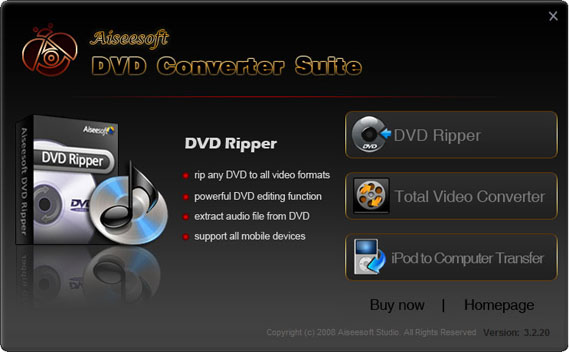
Step 1. Click “DVD Ripper” on the main interface to run Aiseesoft DVD Ripper.

Step 2. Open your DVD Drive and put your DVD in it, then click “Load DVD” and choose “Load DVD” to load your DVD into this best DVD ripper.
Step 3. Choose your output format from the “profile” drop-down list. This best DVD ripper provides you so many formats that out of your expectation, such as “iPod video MPEG 4 (*.mp4)”, “iPhone 3G MOV 640*480 (*.mov)” and so on.

After you choose your output format, you can adjust your output video’s settings, such as “Resolution”, “Frame Rate”, “Bitrate”, “Sample Rate” and so on.
Click “Start” now to begin your conversion and you will get your video soon.

To make your output movie more enjoyable you can do some editings to it through this best DVD ripper. You can choose a part of your movie to convert (trim), remove the black edges of your DVD movie (crop) and also adjust the effect (effect) and select subtitle and audio track.

Part 2. How to convert all video to MP4, AVI, FLV, 3GP, WMV, MOV, MPG, RM, RMVB, MKV, VOB…

Step 1. Click “Total Video Converter” on the main interface to run Aiseesoft Total Video Converter

Step 2. Click “Add File” to load the video you want to convert.
Step 3. Choose output format by clicking “profile” and customize your own output video by
clicking “settings” to adjust the Resolution, Frame Rate, Bitrate and so on.
Before you click “Start” to begin your conversion, you can do some editing works, such as pick up a part of your video to convert(trim), choose your own play region(crop) and put two or more files into one.(merge into one file).
OK, now you can begin your conversion.

Part 3. How to backup iPod songs and videos on your computer.
Step 1. Click “iPod to Computer Transfer” to run Aiseesoft iPod to Computer Transfer.

Step 2. Plug your iPod to your computer and the Aiseesoft iPod to Computer Transfer can automatically scan and find your iPod.
Step 3. Choose the songs and videos you want to backup.
Step 4. Click “export to PC” button to transfer your songs and videos to your Computer.

2012年2月19日星期日

Confirmed: iPad 3 Has a 2048x1536 Retina Display

iPad Converter is dedicated to developing apps for Apple iOS devices.

Over the past couple of months, several photos of displays claimed to be for the iPad 3 have surfaced from various sources. Such parts leaks are typical with the device's expected debut early next month. While reports have claimed that these displays are high-resolution "Retina" displays, there has been no definite confirmation of these claims so far.

MacRumors has now been able to obtain one of these iPad 3 displays and examine it under a microscope in an effort to determine whether it is indeed an ultra-high resolution Retina display. Physically, the purported iPad 3 display is the same size as the current iPad 1 and iPad 2 display at 9.7" in diagonal, and looks quite similar to the naked eye.

However, when comparing the iPad 3 display to one from an iPad 2 under a microscope, the difference in resolutions becomes readily apparent, with the iPad 3 display's pixels appearing to be one-quarter the size of those on the iPad 2.

Since we only had a raw iPad 3 display with no method to power it, taking high quality photos of the pixels was difficult. Still, even with the relatively poor lighting, you can easily make out the pixels on each display (made up of red, green and blue elements). We highlighted a cluster of 4 pixels (2x2) from the iPad 2 to compare it to the same area on the iPad 3. On the iPad 3, the same cluster was occupied by 16 pixels (4x4) -- exactly twice the resolution in each direction.

Extrapolating out, the iPad 3 screen should carry a full resolution of 2048x1536, exactly twice the linear resolution of the iPad 1 and iPad 2 which is 1024x768. Such a screen should be able to display much sharper images as compared to the previous generation iPads.

While these iPad 3 screens weren't directly sourced from Apple, they are labeled as OEM replacement parts for the iPad 3 and are apparently in mass production. The difficulties of any 3rd party in mass producing 2048x1536 9.7" Retina displays make us quite confident that these represent legitimate iPad 3 parts.

Apple is expected to introduce the iPad 3 with a media event on March 7, and the device is rumored to be carrying this high-resolution display, a new A6 system-on-a-chip, and LTE support for models with cellular data capabilities.

2012年2月16日星期四

Why did Amazon China pull Apple's iPad From Shell?

By iPad Video Converter, which is dedicated to developing apps for Apple iOS devices.

A new report claims Amazon removed the iPad from its Chinese website at Apple's request because it is not an authorized reseller, not because of pressure from a high-profile ongoing trademark dispute between Apple and Proview.

After Apple's iPad disappeared from Amazon.cn earlier this week, some were quick to speculate that the move was connected to a legal battle between Apple and Proview over the iPad trademark in China.

However, people familiar with the matter told The Wall Street Journal that Apple had requested Amazon China stop selling the iPad because it lacked the proper authorization to offer the device. According to the source, the Cupertino, Calif., iPad maker had been working with Amazon for weeks to have the listings taking down.

The tipster went on to clarify that the issue was separate from the escalating disagreement between Apple and Proview that came to a head earlier this week. But, it remains unclear whether the removal of iPad listings from Chinese retailer Suning that also occurred this week is related to that lawsuit.

After suing Apple for trademark infringement, Proview succeeded in convincing some mainland authorities to confiscate iPads in smaller cities throughout Beijing beginning last week.

Apple maintains that it purchased the Chinese rights to the iPad mark in a multi-country deal several years ago. “Proview refuses to honor their agreement with Apple in China,” said spokeswoman Carolyn Wu.

A previously unpublished court ruling from last July showed that the High Court of Hong Kong sided with Apple on the matter and demanded Proview transfer the trademark over to Apple.

At the time of the removal, an Amazon China spokesperson indicated that the iPad had been removed at Apple's request rather than as a result of actions associated with the trademark dispute, but Apple's reasons for the request were unknown.

The Wall Street Journal now reports that Apple did indeed request that Amazon China remove the iPad from sale, simply due to Amazon China not being an officially authorized retailer.

The Cupertino, Calif., consumer electronics giant asked Amazon in China to stop selling iPads because it is not an authorized reseller, according to people familiar with the matter. Amazon has since removed iPads offered by other resellers on its Chinese website as well.
The report's sources indicate that the move was not specifically related to the ongoing trademark dispute, although the timing suggests that it perhaps did play some role in the decision, if only by spurring Apple to reassess iPad distribution in China and tie up any loose ends.

While Chinese courts have so far ruled against Apple in the trademark dispute with Proview Technology, Apple has noted that it did win a court case on the issue in Hong Kong last year. The Wall Street Journal's report offers some additional details on that decision, which held that Proview and its subsidiaries had conspired against Apple in a scheme to extract more money from Apple.

The court said, in its findings, that Proview, its subsidiaries and at least one other company had combined together "with the common intention of injuring Apple," by breaching the agreement over the iPad name. The court, calling the event a conspiracy, further said Proview had "attempted to exploit the situation as a business opportunity," by asking for money.

"It is accordingly important that (Apple) is able to secure and obtain the China trademarks," the court wrote in its decision.

2012年2月15日星期三

Apple iPad 3 Will Come in Early March

According to the report of AllThingsD, Apple will hold an event to launch the iPad 3 in the first week of March.

Sources say the company has chosen the first week in March to debut the successor to the iPad 2, and will do so at one of its trademark special events. The event will be held in San Francisco, presumably at the Yerba Buena Center for the Arts, Apple’s preferred location for big announcements like these. No word yet on a street date for the iPad 3 (assuming that’s what it’s called), though my guess is retail availability will follow roughly the same schedule as that of the iPad 2: Available for purchase a week or so after the event.

Last year, Apple introduced the iPad 2 with a media event on March 2, following that up with the first round of launches on March 11.

Japanese blog Macotakara brings us a photo, which shows a 9.7-inch LCD panel. It is said that this panel is said to be a 2048×1536 high-resolution display set for inclusion in the iPad 3 made by Sharp. The panel shows three ribbon cables connecting the display to its circuit board, in line with a previously-leaked photo of a claimed iPad 3 panel. The iPad 2 panel only utilizes two ribbon cables, with the additional cable on the new panel thought to be required to support its higher resolution.

Meanwhile, The New York Times also presents its own sources – the iPad 3 will be equipped with a faster processor and a “truly amazing” screen, and it is identical in appearance to the iPad 2.

An Apple employee said that the version of the new iPad that is being tested inside the company is “essentially the same size and shape as the iPad 2,” with an improved and “truly amazing” screen. The tablet will include a faster processor, said the employee, who did not want to be identified because Apple is not fond of leaks.

Aiseesoft is dedicated to developing the best iPad assistant software. We have a full range of iPad software – iPad Video Converter, DVD to iPad Converter, iPad Transfer, and so on. This wonderful software could help users convert most popular video and DVD movie files to iPad compatible formats. Also users can conveniently export iPad files to computer and import local files to iPad. We will update all these software to support the iPad 3 immediately after the release of iPad 3.

2012年2月13日星期一

How to convert MTS/M2TS video?

MTS or M2TS format is the equivalent of h.264 or MPEG-4 AVC. It is a fairly new High Definition codec that provides greater compression than the regular MP4 and others. Those two High Definition format always be used on HD Camcorder, such as Sony, Canon or Panasonic.

As they are HD video, most of our video editor such as windows movie maker can not edit it directly. And also you can not upload it to youtube.com and share with your friends.

So you need to convert them into normal video format, such as wmv, mp4, avi and so on.

Here I know a really powerful MTS Converter and
M2TS Converter

And the process of operation is really easy and fast.

Part 1: How to convert MTS video
Step 1: Load Video
Click “Add File” to load the video that you want.

Step 2: Choose Your Output Profile and Settings
From “Profile” drop-down list you can choose your output profile according to your need.
For example, if you have a iPod and you want to convert video for it, you need to choose “iPod” from the profile list and then it also provides the second chance to specify your iPod generation.
You can also click “setting”adjust the settings of your output video, such as “video/audio encoder”, “Video/audio Bitrate”, “Channels”, “Resolution” and so on..

Step 3: Conversion
After you have done all the steps above you can click “Start” button to start your conversion.

Part 2: How to convert M2TS video
Part 3: How to convert M2TS video

Step 1: Add File
Load your M2TS video.

Step 2: Choose Profile and Settings
Select your output profile according your need and adjust the settings of your output video if you like.
(the default setting works well)

Step 3: Start Conversion
Click “Start” to begin your conversion.

Here I also recommend you a really nice HD Converter, which can convert HD TS, HD MTS, HD M2TS, HD MPEG, HD WMV, HD MPG, HD MP4, QuickTime HD MOV, HD H.264, HD RM video, etc

2012年2月8日星期三

Galaxy Nexus System Updates With Android 4.0.4 Exposure

Although Android4.0.3 has been introduced for a long time, so far the Samsung Galaxy Nexus operation is still Android4.0.2 system. And compared with 4.0.3, 4.0.2 version not only the application interface is not novel, but also often discovered some Bug. However, today good news comes, foreign science and technology forum members of the XDA-Developers Galaxy Nexus have released the latest ice cream sandwich version -- Android4.0.4, Galaxy Nexus users can upgrade to this version of OTA.

Reportedly, the new version of Android 4.0.4 is currently limited in version of CDMA Galaxy Nexus.

The system has revealed new features including:

- faster running performance

- Android operating system vulnerability ( battery problem ) repairs

- 3G / 4G switching improvement

- Signal intensity enhancement

- New Power menu ( Different from 4.0.2, near 4.0.3 )

- Quicker start

- Automatic brightness adjustment function change. Smooth transition

- Adjust the camera's Holding down button

- multi-touch solving ( which developers are not too sure )

- Automatic rotating more quickly

- the browser's performance improved significantly

- Recent list of applications to open more quickly

- Changes of UI - Camera

- increase the volume

- Keyboard fixing problems

- UI of updated news and weather application

- Browser's fast control improvement

To be frank, if you are interested in iOS devices, you can join the iPad Converter Club.

2012年2月7日星期二

Aiseesoft Introduces Brand New iPad Converter Suite Platinum for All iPad Users

For all iPad users, Aiseesoft's iPad Converter Suite Platinum is definitely one of the best assistant software products. This professional iPad software enables users to rip any DVD and convert most popular video files to iPad formats, and transfer files between an iPad and a computer.

Aiseesoft's iPad Converter Suite Platinum is packed with iPad Video Converter, DVD to iPad Converter and iPad Transfer Platinum. The iPad converting software can help customers convert most popular DVD movies and videos to iPad-compatible video and audio formats. And the output video quality is perfect. This software also has powerful video editing features. With this iPad converter software, users can trim video length, crop video frame, watermark video, merge video clips together and so on. Moreover, this application can bring users a much higher converting speed with the AMD APP and NVIDIA-CUDA GPU processing acceleration technology.

The built-in iPad Transfer Platinum is an amazing iPad files transferring software. It is able to export all iPad files (movie, music, pictures, TV shows, podcast, iTunes U, eBooks, camera roll, voice memos, camera shot, etc.) to a computer, iTunes and other iPad devices. Also this software allows customers to import local files to an iPad. Besides the iPad, this software is highly compatible with iPod and iPhone devices. It can transfer iPhone SMS and Contacts to computer, and backup these files in this program. With this powerful transferring software, users can avoid the severe limitations and complex operations of Apple's iTunes.

Aiseesoft's iPad Converter Suite Platinum, which owns professional DVD/video converting functions and files transferring features, can help users fully enjoy interesting movie, picture and music files on an iPad anywhere and anytime.

System Requirements

OS Supported: Windows NT4/2000/2003/XP and Windows Vista, Windows 7
Hardware Requirements: 800MHz Intel or AMD CPU, or above; 512MB RAM or more

About Aiseesoft Studio

As a professional multimedia software provider, Aiseesoft Studio is dedicated to developing the best multimedia desktop applications to help the Windows and Mac users smoothly convert, edit and transfer various video/audio files. In order to meet users' various requirements, Aiseesoft Studio constantly brings in new ideas, technologies, etc.

2012年2月6日星期一

2012 Best DVD Ripper for Mac and Video Converter for Mac

With the application of various portable devices, video converters have become one indispensable tool to solve the incompatibility among different file formats. One video converter could help you convert a video file to any video format you need. And you can rip any DVD movie to your devices to watch on other than a DVD Player. Video Converter for Mac and DVD Ripper for Mac are the best tools to realize these ideas on the Mac OS.

Aiseesoft DVD Ripper for Mac aims to rip DVDs to various video and audio formats on the Mac for playback on an iPod, iPhone, iPad, Apple TV, PSP, PS3, YouTube, and all kinds of cell phones and digital players. It also owns powerful editing functions like Video Converter for Mac.

Aiseesoft Video Converter for Mac is specially designed to convert between all popular video formats and extract audio from video and convert them to other audios. It works perfectly on all mainstream video/audio players, such as iPods, iPhones, Apple TV, Pocket PCs, YouTube and mobile phones. This best Mac Video Converter also has more practical editing features.

Both DVD Ripper for Mac and Video Converter for Mac will bring you an unexpected audio-visual feast. If you are interested in, free-download one and begin to your fantastic digital life now!

Price and Availability

Aiseesoft DVD Ripper for Mac is now priced at $ 35.00

System Requirements

OS Supported: Mac OS X 10.4 or above
Hardware Requirements: 512MB RAM, Super VGA (800×600) resolution, 16-bit graphics card or higher

2012年2月5日星期日

Top Five DVD to WMV Converters Reviews

WMV is a really popular video format, may video player can play .wmv video, such as GPhone, BlackBerry Storm, BlackBerry Bold, Palm Pre, Zune, Zune 2, PSP, PS3, Xbox 360 and so on. It is so popular, so what is wmv format, and how we can convert DVD and other video format to wmv format?

What is WMV video?
Developed and controlled by Microsoft, WMV stands for Widows Media Video. It is a generic name of Microsoft's video encoding solutions and doesn't necessarily define the technology what it uses.

Why we need to convert DVD to WMV?
Two reasons for this question. First, when we want to watch DVD movies on our portable video players and cell phones, we need to convert DVD to WMV. Second, when we try to put our DVD movies to windows movie maker to edit, we need to convert DVD to WMV.

What are the top DVD to WMV Converters on the market?
Top 1:
Aiseesoft DVD to WMV Converter.

Reviews:
Super fast conversion speed and incomparable output quality with a nice interface. Besides the great performance on conversion, the advantage of video editing function is really obvious. And it's price is reasonable.

Function:
Convert DVD to WMV, WMA, MP3 format.
Works perfectly with Zune, Gphone, Blackberry Strom, Blackberry Bold, Palm Pre, Xbox 360, PSP......
Choose subtitles and audio tracks.
Trim output video
Crop output video
Adjust the effect of the output video
Snapshot

Top 2:
4Videosoft DVD to WMV Converter

Reviews:
Conciseness of the interface with powerful conversion quality and outstanding speed. Also has video editing functions, trim, crop, merge and so on.

Function:
Convert DVD to WMV
Choose subtitles and audio tracks.
Trim, crop, merge output video
Adjust the effect of the output video
Save picture of the video

Top 3:
Cucusoft Ultimate DVD Converter

Reviews:
Powerful conversion function and fast speed. The only editing function is crop and also the interface is unconspicuous and a little wooden. The price is a little expensive.

Function:
Convert DVD to WMV
Choose subtitle and audio track
Crop output video

Top 4:
Aiseesoft DVD to WMV Converter for Mac

Reviews:
It is a really powerful Mac DVD to WMV converter. Outstanding conversion quality and speed, powerful video editing function with a gentle interface makes it the top 4 DVD to WMV Converter.

Function:
Convert DVD to WMV on Mac.
Support all devices
Trim, Crop, Merge output video
Adjust the Effect of the output video
Do snapshot

Top5.
Aiseesoft DVD Converter Suite

Reviews:
It easily convert DVD and video to all the popular formats, extract audio from DVD movie or video file and transfer songs and video from iPod/iPhone to PC.

Function:
Convert DVD and any video/audio to the various video/audio formats
Support almost all popular portable players
Transfer songs and video from iPod/iPhone to PC
Easy and powerful editing function (Merge, Trim, Crop)
Set video effect

2012年2月2日星期四

Article from Forbes: Ten Reasons for not investing in Facebook

iPhone Transfer can backup your iPhone files between your device and Computer.

Forbes magazine network edition today published an article signed by Caim Mike Nicholas, showed ten unfavorable investment reasons in Facebook.

The following is the main content of the article:

If you are Robert Scoble (well-known technology blogger) fan, so you must know his idea by 2015 Facebook will be valued at $500 Billion. However, in Facebook listed what has no investment value problem, and not all people like skoubo so confident.
However, after Facebook listing in the end whether there is investment value on the issue, not all people like skoubo are so confident.

Asset Management Firm Wealth Preservation & Retirement Planning financial adviser Robert Black issued Warning to investing in Facebook, the following are two reasons for not investing in Facebook:

One, Both the number of Monthly active users ( MAU ) and Daily Active Users (DAU ) are declining.

In 2011, Facebook month active user number is 845 million, 38% growth, but growth in 2010 is 69%;

In 2011, Facebook, the number of daily active users for 483 million, 48% growth, but growth in 2010 is 77%.

Two, The cost of acquiring new users grows increasingly high

In 2011, Facebook profit is 1.76 billion dollar, growing 71%, compared to the same period, the marketing and sales costs growth is 132%; in addition, the 2011 Facebook cost growth of 107%, exceeded the revenue growth rate. Black said:" Facebook 's performance last year in 2010 and formed a sharp contrast to 2010. In 2010, Facebook's marketing and sales costs increased by only 60%, but revenues grew by 153%."


The following is my collected eight other unfavorable investment Facebook reasons from Facebook, Twitter and LinkedIn platform users:

Three, Ahhha.com's founder and CEO Matthew Crowe: era belonging to the Facebook is transient, the site did not create the" real" value, although Zuckerberg claimed to make people based on the Facebook contact, but in fact it lets the people contact less in reality.

Four, Shelly B: people on the Facebook gets more and more tired. I think, Facebook users can not accurately reflect the current active user number. Instead, Twitter will become more popular.

Five, a business analyst Kjetil Faye Lund : Facebook 's popularity may drop, advertisers will be shifted to other fields looking for opportunities.

Six, GraffitiPR CEO Shaun Saunders: Facebook makes it inefficient, brain lapse, engage in bad relationships with people, letting people behave in public differently, particularly. If the existence of the problem, what is the value of Facebook to Procter & Gamble?

Seven, Jason Blackburn: Facebook IPO price should be higher than LinkedIn too much, I'm waiting for MySpace to invite back Tom to achieve recovery plan.

Eight, Public relations firm Ignite Public Relations executive Carmen Hughes: Facebook should take the auction model for IPO. In view of investment banks in recent market turmoil uproar, taking the auction model may be more popular.

Nine, Charity Fire's founder and CEO Rocco Chappie: $100 billion valuation is too high, at least overdrafting Facebook two years' growth performance. Unlike apple, I think Zuckerberg did not produce like iMac, iPhone or iPad such best-selling products. Facebook would like Netscape, Yahoo! And AOL, will finally fall.

Ten, My idea: 12% of Facebook 's revenue is from social game developer Zynga. If Zynga can get rid of Facebook, which means what?
DVD to iPhone Converter

2012年2月1日星期三

Nokia Symbian takes on a brand-new look and Bella system upgrades

Nokia in strongly promoting the Windows Phone platform mobile phone and at the same time it released the Belle operating system in August last year. It has also released the intelligent mobile phone Nokia 700, Nokia 701 and Nokia 603 carrying that operating system. and promised that the mobile phones carrying the Symbian ^ 3 and Anna mobile phone operating system upgrades to the new Belle system. Now, Nokia has finally taken practical action.

WP Belle System Upgrades

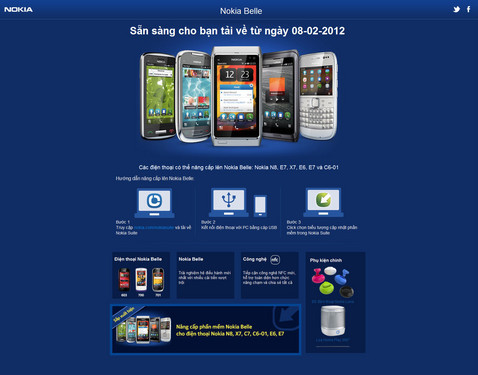
Through its official Twitter account, Nokia disclosed, in a few areas, users prior to purchasing the Nokia N8, C7, E6, X7, C6-01, can upgrade to Nokia Belle operating system, and the new batch of the Nokia N8, C7, E7, X7, E6 and C6-01 has built the new Belle system, and has began selling in Turkey and India.

Nokia Vietnam official website has been announced, it will begin on 8th, February upgrading for the above models with Nokia Belle system. According to previous reports, Nokia will begin in February this year in all over the world to provide the latest operating system, it seems Chinese users want to experience the latest Nokia Belle operating system, also need to wait for a period of time.

No matter what nokia devices you are using, this Total Video Converter can certainly help you.